Siri Recap and Live Rewind: What Apple Watch Can Actually Transcribe
Apple's Audio Intelligence features give the watch a 15-second text buffer and AI conversation summaries. Here is what they do, who qualifies, and what they leave out.
Not in the way most people mean. Apple Watch Series 12 and Ultra 4 add Live Rewind, a rolling 15-second text snippet, and Siri Recap, which writes summaries of what it hears. Neither produces a verbatim transcript of a conversation.
What Apple announced on September 9
Apple held its Surprise and Shine keynote at Apple Park on September 9, 2026. It was the first keynote with John Ternus as chief executive. Alongside Apple Watch Series 12 and Apple Watch Ultra 4, the company introduced a group of listening features under the name Audio Intelligence.
Four features sit under that name. All four depend on the S11 chip inside the two new watches, so no earlier Apple Watch gets them.
- Live Rewind. A double press of the Digital Crown shows the previous 15 seconds of conversation as a text snippet.
- Siri Recap. Ambient listening that produces high-level notes on conversations, with a title, a summary, and key points.
- Sound Recognition. Detects sirens, alarms, doorbells, and a baby crying, then notifies the wearer. It works even when the iPhone is not nearby.
- Shazam. Background music identification, surfaced in the Music Recognition widget in the Smart Stack.
Sound Recognition and Shazam ship with the watches. Sound Recognition is the more interesting of the two, because it is built as an accessibility feature and does not need the phone in range to work.
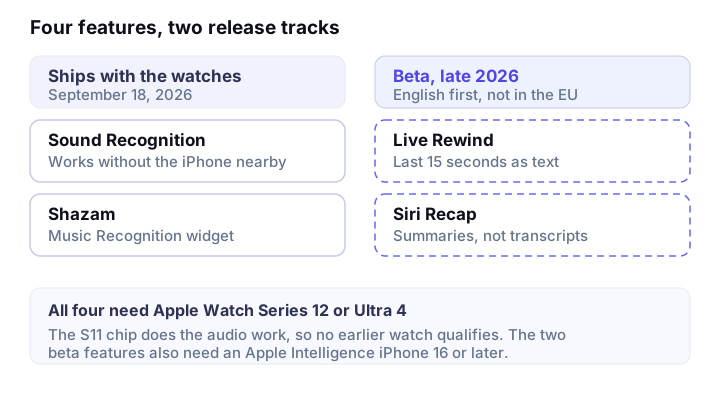
Live Rewind and Siri Recap are the two people are searching for, and they are the two that are not ready. Both arrive in beta in late 2026, and the requirements attached to them are heavier than the keynote made them sound.
Apple Watch Series 12 starts at $399 and Apple Watch Ultra 4 at $799. Both go on sale September 18. watchOS 27 arrives on September 14.
Live Rewind, explained
Double press the Digital Crown and the watch shows you the previous 15 seconds of conversation as text on screen. That is the feature. It is a short rolling buffer of what was just said, surfaced after the fact.
From that snippet you can ask Siri a question about it, or save it into the new Siri app. Anything older than the last 15 seconds is gone.
Two signals fire when Live Rewind activates. The watch plays an audible chime and shows a visible microphone indicator. Both are deliberate. They tell the people around you that the watch just did something with audio, which matters in a conversation where the other person never agreed to anything.
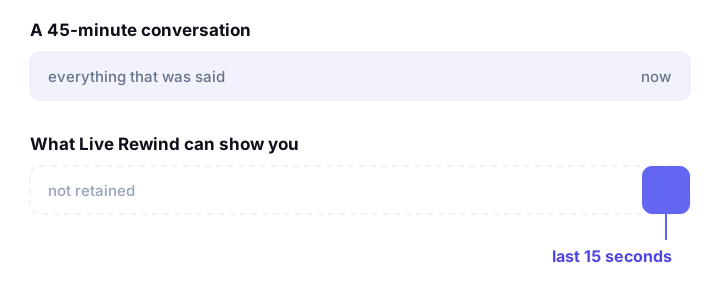
This is a recall tool. It answers the name you missed, the room number, the dosage, the flight time. It was not designed to answer what happened in the meeting.
Siri Recap, explained
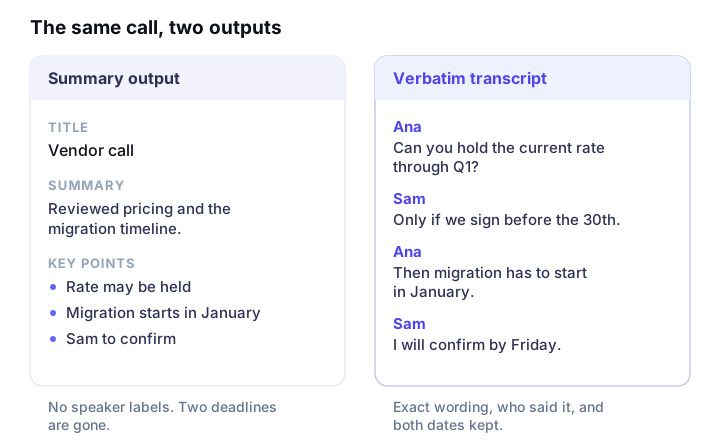
Siri Recap listens ambiently and writes high-level notes on conversations. Apple Intelligence generates a title, a summary, and a set of key points, and you review the result in the Siri app.
Apple is direct on the point that matters most here: these are summaries, and they are not verbatim transcripts. Siri Recap also does not identify speakers, so notes from a three-person meeting read as one account of what was discussed rather than a record of who said what.
Control comes in three states. You can leave Siri Recap on, put it on a schedule, or turn it off. The schedule option is the practical one for anyone who wants notes during working hours and nothing after them.
Apple's own guidance is that the output may be incomplete or inaccurate, and that important information should be confirmed another way. That warning is worth taking at face value. It describes the gap between a summary and a record.
Who can actually use it
This is the part most coverage buried. Sound Recognition and Shazam need one of the two new watches and nothing else. Live Rewind and Siri Recap carry a longer list, and any single line in the table below is enough to rule you out.
| Requirement | What it means |
|---|---|
| Watch hardware | Apple Watch Series 12 or Apple Watch Ultra 4. The S11 chip does the audio work, so no earlier model qualifies. |
| Paired iPhone | An Apple Intelligence iPhone, model 16 or later. The iPhone 16e is excluded. |
| Siri | Siri AI is required, and it is itself rolling out in beta. |
| Release timing | Beta in late 2026. Sound Recognition and Shazam ship with the watches instead. |
| Language | English at launch. Apple says more languages follow, without naming them or giving dates. |
| Region | Not available in the EU at launch. |
| Age | Not available to users under 13. |
| Usage caps | Daily limits apply, because both features rely on server-side models rather than running entirely on the watch. |
Put together, the practical audience at launch is narrow: someone outside the EU, over 13, on a brand new watch, with a recent iPhone, in English, once the beta opens, within a daily cap.
How Apple handles privacy
Apple made a specific set of claims about Audio Intelligence.
- No audio recordings are created or stored.
- Raw audio is processed in an isolated Secure Exclave on the S11 chip and deleted after processing.
- Raw audio is not accessible to apps, to the operating system, or to Apple.
- Siri Recap and Live Rewind content can be end to end encrypted when it syncs through iCloud.
- Siri Recap attempts to filter sensitive content such as financial information and government-assigned identifiers. Apple says the automated filtering may not remove all of it.
- Output may be incomplete or inaccurate, and important information should be confirmed another way.
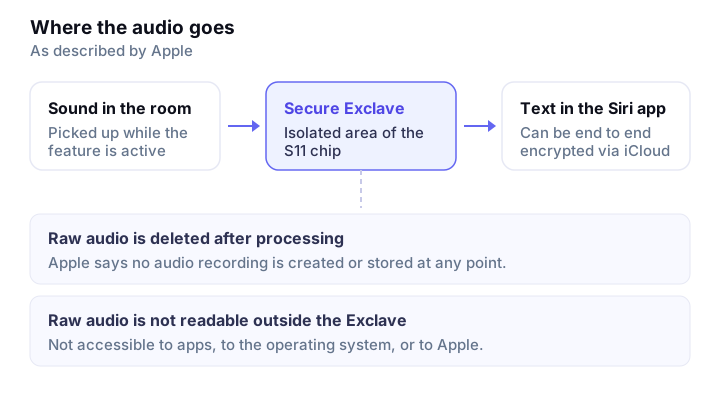
Those claims answer where the audio goes. They do not answer the other question in the room, which is whether the person across the table agreed to be summarized.
Recording and consent rules vary by country, and in the United States they vary by state. Some places require every party to agree. Others require only one. The chime and the microphone indicator make activation visible, and that is a real design decision, though visibility and consent are different things.
Where a dedicated transcription app still does the job
- 1
Fifteen seconds is a recall buffer, not a record
Live Rewind exists to answer what someone just said. A 45-minute meeting, a two-hour lecture, or an hour-long interview sits outside its scope by design, and no amount of double pressing the Crown recovers the first 44 minutes.
- 2
Summaries omit detail on purpose
A title, a summary, and key points are the right output for what happened today. They are the wrong output for a quote you need to reproduce exactly, a lecture you will be examined on, or notes attached to a legal or medical record. Those need verbatim text.
- 3
No speaker separation
Siri Recap does not identify speakers. In an interview, a panel, a deposition, or a user research session, who said which sentence is frequently the entire point of keeping notes at all.
- 4
Nothing for audio you already have
Audio Intelligence works on sound in the room, live. It does nothing for the voice memo from last week, the recording a colleague emailed you, or a YouTube link. The TranscribeX listings cover uploading existing audio files including MP3, M4A, and WAV, importing a PDF, and pasting a YouTube link to get the full transcript.
- 5
English only, no EU, two watches
The launch gates are the plainest gap of all. The Google Play listing for TranscribeX states 98 languages with automatic language detection, on hardware people already own.
- 6
Daily caps on the server-side features
Live Rewind and Siri Recap both depend on server-side models, and Apple applies daily usage limits to features that do. A cap is manageable for occasional recall and awkward for a week of back-to-back meetings.
The listings also cover what happens after the transcript exists. Every transcript comes with an AI summary and bullet-point key takeaways, and you can ask questions about a transcript and get answers back. On the Google Play listing, recordings and notes stay on your device.
None of that competes with Live Rewind. Checking a number someone said 10 seconds ago is a genuinely different job from producing the text of a meeting, an interview, or a lecture. Apple built the first one. The second one still needs a transcription app, and transcribing a voice memo you saved months ago works the same way there as transcribing something you record today.
Frequently asked questions
Siri Recap is an Apple Watch feature that listens ambiently and writes high-level notes on conversations. Apple Intelligence produces a title, a summary, and key points, which you review in the Siri app. It is a summary rather than a verbatim transcript, and it does not label who spoke.
Not as a full transcript. Live Rewind shows the previous 15 seconds of conversation as text when you double press the Digital Crown, and Siri Recap writes summaries of what it hears. Neither produces a word-for-word record of a long conversation. For that you need a dedicated transcription app.
Live Rewind requires Apple Watch Series 12 or Apple Watch Ultra 4. Both run the S11 chip that handles the audio processing, so no earlier Apple Watch supports it. Series 12 starts at $399 and Ultra 4 at $799, with both models on sale from September 18.
You need an Apple Intelligence iPhone, model 16 or later, with the iPhone 16e specifically excluded. You also need Siri AI, which is rolling out in beta itself. Both Siri Recap and Live Rewind carry daily usage limits, because they depend on server-side models rather than the watch alone.
Siri Recap and Live Rewind start in English when they enter beta in late 2026. Apple has said more languages will follow but has not named them or given dates. Sound Recognition and Shazam, the other two Audio Intelligence features, ship with the watches rather than waiting for that beta.
No. Apple says Live Rewind and Siri Recap are not available in the EU at launch. No date has been given for EU availability, and Apple has not said what would change that. If you are in the EU and need transcription now, a cross-platform app is the practical route.
Get the transcript, not just the gist
Record a conversation or bring audio you already have. TranscribeX turns it into text you can read, search, and quote.


Sources
Related tools
TranscribeX is not affiliated with or endorsed by Apple. Apple, Apple Watch, and Siri are trademarks of Apple Inc.